

Your biggest customers might send orders through EDI. Everyone else sends a PDF.
So someone watches the orders inbox, opens each attachment, and keys the order into Macola line by line: customer, ship-to, items, quantities, prices. On a quiet day that's manageable. On a busy day, orders sit in the inbox waiting their turn, and a transposed quantity doesn't show up until picking, shipping, or invoicing.
This post walks through a real workflow our team built in AI Automation that takes those emailed purchase orders from the inbox all the way to a sales order in Macola. If you've been looking for a way to automate Macola purchase orders that arrive by email, without asking every customer to change how they send them, this is what it looks like.
Why emailed POs are still a manual job
Emailed purchase orders stick around for good reasons. Plenty of customers don't do EDI and never will. Each one sends orders in its own layout, from its own system. And the order is legitimate business you want to process quickly, so it can't just wait.
That leaves a job with a lot of repetition and very little judgment:
- Watch the inbox for anything that looks like a PO
- Open the attachment and read it
- Type the order into Macola
- Hope nothing got mistyped along the way
Most of that work is reading and re-keying. That's exactly the part software can take over, as long as it can handle different layouts and knows when to ask for help.
What the automated workflow does
Here's the workflow step by step. It's Use Case 2 on our Macola workflow automation page, built in AI Automation with no code involved.
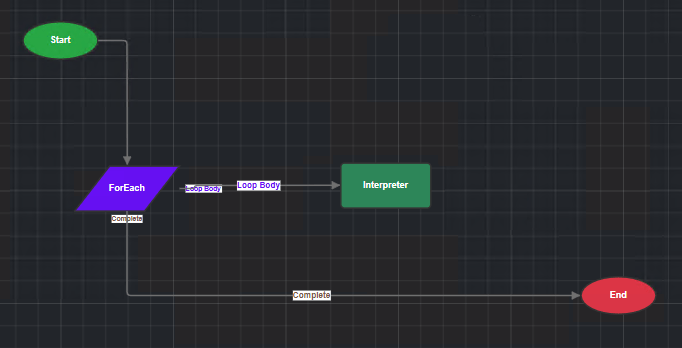
1. It watches the orders inbox
The workflow monitors your orders mailbox. When an email arrives with "PO" or "Purchase Order" in the subject line and at least one attachment, the workflow starts. Everything else in the inbox is left alone.
2. It saves the attachments
The workflow saves each attachment from the email, so one email carrying several purchase orders is handled just as easily as one carrying a single PO.
3. AI Interpreter reads each purchase order
Each attachment runs through AI Interpreter using a sales order template. Interpreter reads the document and pulls out what Macola needs: the customer, items, quantities, and the rest of the order details. It handles documents from different customers in different layouts, and reads more than PDFs, including Word, Excel, and image files.
4. The sales order is entered in Macola
In the workflow our team built, the Interpreter template is set to process automatically. From the moment the email arrives to the moment the order is in Macola, nobody touches it.
What happens when Interpreter isn't sure
Automatic doesn't mean guessing. When Interpreter isn't confident about a field, whether a quantity is smudged, a part number doesn't match, or something required is missing, it doesn't push the order through. It flags that document as needing attention in Interpreter's Inbound Manager, where someone on your team can review the specific field in question and fix it.
That's the real shift for your order-entry team. Instead of keying every order, they look only at the ones that genuinely need a second look. And every submitted document becomes a permanent, read-only record, so you always have an audit trail of what came in and what was entered.
If you'd rather have a person check every order at first, Interpreter templates don't have to process automatically. Many teams start with review on, watch the results for a few weeks, then switch to automatic once they trust them.
Why this is a workflow, not just document reading
AI Interpreter is what reads the purchase order. AI Automation is what connects your inbox to it and decides what happens around it. That distinction matters once you start building on the basics:
- Notify the team. Post a message in Microsoft Teams or Slack whenever an order is entered, or only when one needs attention.
- Handle more than one inbox or document type. Route different subject lines or senders to different templates.
- Chain into what happens next. A new order can kick off the next workflow. For example, if it lands on credit hold, the credit hold approval workflow routes it to an approver and sends the order acknowledgement once it's released.
If you want the broader view of what AI can do alongside Macola, including where document processing fits, AI for Macola ERP: What's Actually Possible in 2026 covers it.
Email POs and EDI can work side by side
This isn't a replacement for EDI. If your largest trading partners already send orders electronically, keep that running. The email workflow covers everyone else: the customers who send a PDF, a spreadsheet, or a scanned order form, and who aren't going to change that because you asked.
In practice, that's often a long tail of customers who each send a handful of orders, which is exactly why keying them by hand adds up.
Is it worth it for your team? Four questions to size it
Before building anything, it helps to get a rough picture of the work you'd be taking off your team's plate. You don't need exact numbers; a week of honest tallying is enough.
- How many purchase orders arrive by email each week? Count the ones that end up keyed into Macola by hand, not the ones that come through EDI.
- How many different layouts are there? A few dozen customers usually means a few dozen formats. That variety is where manual entry slows down, and where AI reading helps most.
- How long does each one take? Include the time spent opening the email, reading the PO, entering it, and double-checking it, not just the typing.
- What happens when one is wrong? Think about the last few order-entry mistakes: when they were caught, who fixed them, and whether a customer noticed.
If the answers point to hours every week and mistakes that surface downstream, emailed POs are a strong candidate. If you only get a handful a month, another process may deserve to go first.
What it takes to set up
The work splits between the people who own order entry and the person who builds the workflow.
Your order-entry or customer service team decides:
- Which inbox the workflow watches, and which subject-line words mark a PO
- Which customers or document types to start with
- Whether orders process automatically or wait for review at first
- Who handles orders flagged as needing attention
An IT staff member or power user who knows your Macola data builds it:
- The connection to the orders mailbox
- The Interpreter template that maps purchase order fields to a Macola sales order
- The workflow itself, including any notifications you want
A practical tip: start with one document type, or even a handful of your most frequent customers, before expanding. You'll see results quickly, and the team gets comfortable with the flagged-for-review step before volume ramps up.
If you're weighing this against other processes, run it through the five questions in Which Macola Processes Should You Automate First? Emailed purchase orders usually answer yes to all five.
See it with your own purchase orders
If your team spends part of every day retyping orders from the inbox, talk to us about automation. Bring a few real purchase orders, and we'll show you what this workflow looks like with your documents and your Macola setup.
FAQ Section
Q: How do I automate Macola purchase orders that arrive by email? A: With AI Automation, a workflow watches your orders inbox for emails with "PO" or "Purchase Order" in the subject and an attachment, saves the attachments, runs each one through AI Interpreter, and enters the sales order in Macola.
Q: What happens if the AI can't read part of a purchase order? A: AI Interpreter doesn't guess. If it isn't confident about a field, it flags the document as needing attention in its Inbound Manager so someone can review and fix that specific field before the order is entered.
Q: Can every order be reviewed by a person before it's entered? A: Yes. The workflow our team built processes orders automatically, but Interpreter templates can also hold documents for review. Many teams start with review on and switch to automatic once they trust the results.
Q: Does this replace EDI? A: No. EDI keeps running for trading partners who use it. The email workflow covers customers who send purchase orders as PDFs, spreadsheets, or scanned forms.
Q: Do we need a developer to set this up? A: No. AI Automation is no-code. Your order-entry team decides which inbox, documents, and review rules to use, and an IT staff member or power user who knows your Macola data builds the workflow.

Comments