

The phone rings. A customer wants to know where their order is.
The rep who picks up knows the answer is in Macola. Getting it out is the slow part: find the right screens, or ask a coworker to pull a report, or tell the customer you'll call back. Then the next call comes in and it starts over.
This post shows a simpler way to handle a Macola order status lookup: type the question the way you'd ask a coworker, and get the answer back from live Macola data. It's the first of three use cases we're walking through for AI Agent, and it's the simplest one to picture, which makes it a good place to start.
Why "where's my order?" takes longer than it should
Nothing is wrong with the data. Macola has the answer. The friction is everything between the question and the answer:
- Knowing which screen holds the information you need
- Getting from the customer's words ("my order from last week") to the right record
- Waiting on a report, or on the one person who knows how to run it
- Doing it all again for the next caller
None of these steps is hard. They're just repeated all day, by the people who are supposed to be on the phone with customers. A lookup that should be simple ends up being the thing customers wait on.
What a Macola order status lookup looks like with AI Agent
AI Agent is a plain-language way into the Macola you already run. Everything happens on one chat screen, with no report to build and no screens to hunt through. Here's the flow for a customer service rep.
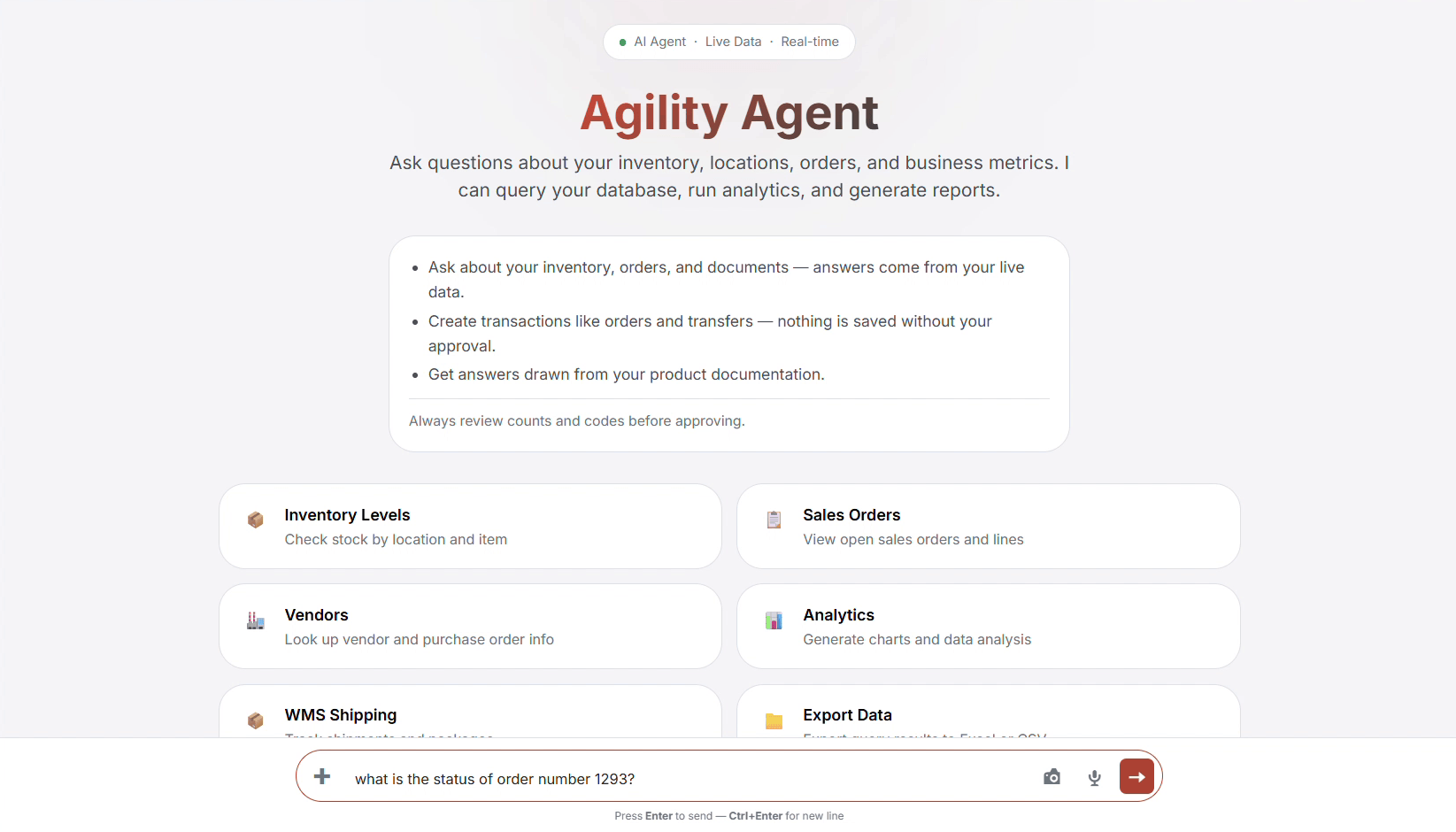
1. Ask the question
Type it the way you'd say it. For example: "What's the status of order 1293?" (Order 1293 is a sample order from demo data.) There's no query syntax to learn and no fields to fill in.
2. Watch it work
While AI Agent plans the lookup against your data, a progress indicator steps through Understanding, Researching, Processing and Composing, so you're not staring at a blank screen wondering whether anything happened.
3. Read the answer
The answer comes from live Macola data and appears right in the conversation. It starts with a plain sentence that answers the question, followed by a small Order Details table and a short Key Findings list, with suggested follow-up questions underneath. It's all still there if the customer asks a follow-up question or you need to refer back to it.
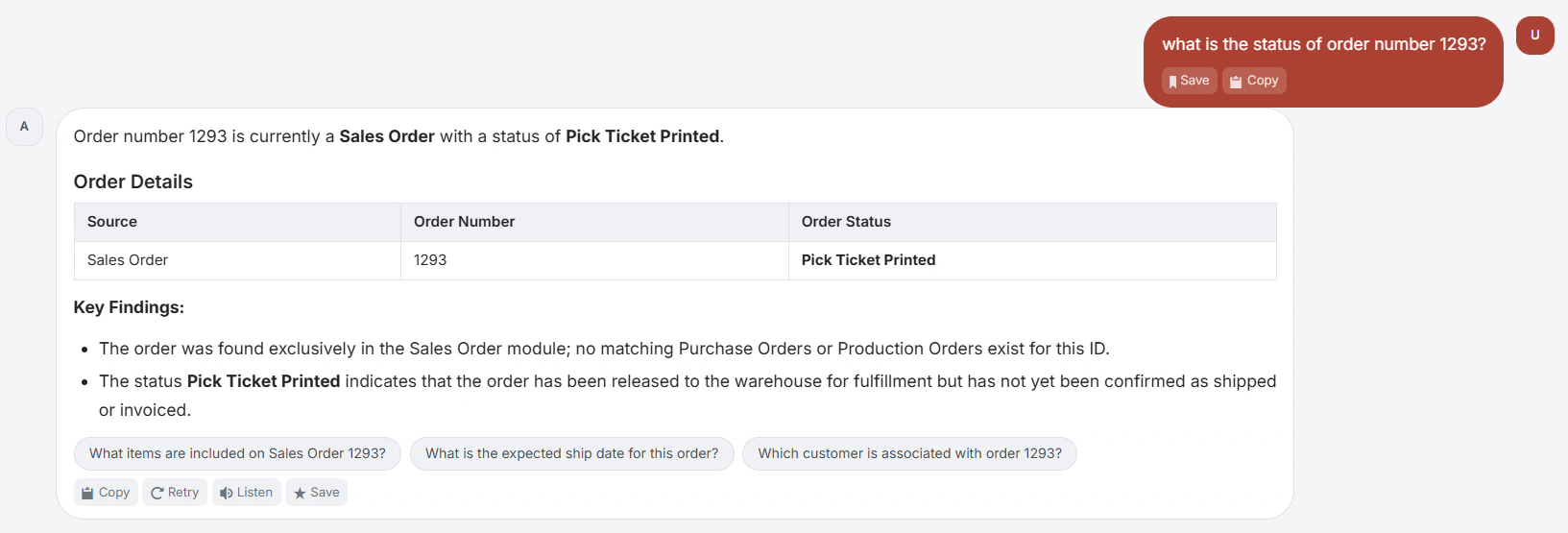
A note on what you'll see. What comes back depends on the data in your Macola and on what that person is allowed to view. That's by design, and we'll come back to it below.
A question can't change anything
This is the part that makes order status a comfortable first use case: asking is read-only. When someone asks AI Agent a question, nothing in Macola is created, edited or deleted. The Agent reads and answers. That's different from the second and third use cases in this series, where AI Agent is asked to do something, and every one of those steps waits for an explicit Approve click.
It also means the access you need is small. To use AI Agent at all, a person needs General Access. To ask questions about a Macola module, they need View Only access to that module. A customer service rep doesn't need anything more than that to check an order.
Questions customer service can ask besides "where's the order?"
Order status is the example most teams recognize immediately, but the same conversation handles the other lookups that fill a service rep's day. Everything below is an illustrative prompt, not a promise of a particular report layout.
- An order question: "What's the status of order 1293?" Check one order without opening a report.
- An inventory question: "How much of this SKU is on hand at the east warehouse?" Stock levels without digging through screens. (East warehouse is an example location.)
- A broader inventory question: "Show me low-stock items." The answer comes back as a table you can save and reuse.
Because it's one conversation, you can ask a follow-up right after the first answer instead of starting a new lookup from scratch.
Getting a good answer the first time
Plain language doesn't mean careless language. A few habits make the lookup smoother, especially in the first week:
- Lead with what you know. If the customer gave you an order number, put it in the question. If they only gave you a name or a rough date, say that instead and ask for what you need.
- Ask one thing at a time. "What's the status of this order?" and then "How much of that item is on hand?" is easier to follow than one long question.
- Check the table, not just the headline. When the answer is a table, read the rows before you tell the customer. You're the one who knows what they were expecting.
And a plain limit: AI Agent can only answer from what's in Macola and what the person asking is allowed to see. If a question is outside someone's access, it's denied rather than guessed at. That's the behavior you want from anything that touches your order data.
Make the repeat questions one or two clicks
Most customer service questions aren't one-offs. The same few get asked all day, so AI Agent includes a few ways to stop retyping them:
- Saved Prompts are your own bookmarked questions. Click one and it drops into the message box, then send it.
- Saved Answers hold responses you've starred to keep.
- Prompt Library is a set of ready-made prompts you can filter by ERP, a good starting point for a new team.
- Recent Sessions lets you reopen an earlier conversation and keep going where you left off.
You can also type a slash in the message box to pick a saved or ready-made prompt. Depending on your build, there may be additional options for saving a question as a reusable template, so ask us what your environment includes.
Who should be able to ask?
Because AI Agent reads live Macola data, the question to settle first is who gets to ask what. Access is set per person and per Macola module, and it's enforced while AI Agent is running. A request for data someone isn't allowed to see is denied rather than guessed at.
For a customer service team, the decision is usually straightforward:
- Which people get General Access. Start with the reps who field order calls.
- Which Macola modules they need View Only access to. Order information is the obvious one; add others only if the team really asks about them.
- Which questions to save as prompts first. Take the five or six your team asks most and save them, so the first week feels familiar instead of blank.
If you're not sure how to set access for your team, the Agility Intelligence team can help you decide before you start.
Watch this question get answered, start to finish. Shown with demo data.
When a lookup should be a workflow instead
AI Agent is built for in-the-moment questions: a person asks, a person reads the answer. If what you actually want is for customers to hear about their orders without anyone asking, such as proactive reminders or notifications, that's a workflow that runs when something happens, not a question someone types. Our Macola workflow automation use cases show what that side looks like, and most Macola teams will end up wanting both.
For distributors in particular, "where's my order?" is one of the most common questions in the building. The solutions for distributors page covers how order-entry, packing and customer service fit together. And if you want the broader picture of what AI can do alongside Macola today, AI for Macola ERP: What's Actually Possible in 2026 is the place to start.
Try it with your own order questions
The best test is a real one. Tell us the question your team gets asked most about orders, and we'll show you how AI Agent answers it in Macola. You can follow along with this use case on our Macola AI Agent use cases page, or read more about AI for Macola to see how it connects to the version you run.
Frequently asked questions
Q: How do I check order status in Macola without running a report? A: With AI Agent, you type a question in plain language, such as "What's the status of order 1293?", and the answer comes back from live Macola data as a plain sentence and a small table in the conversation. There's no report to build or run.
Q: Can asking AI Agent a question change anything in Macola? A: No. Asking a question is read-only. AI Agent reads and answers, and nothing in Macola is created or changed. Only requests to do something, such as creating a transaction, need an explicit Approve click.
Q: What access does a customer service rep need? A: General Access to use AI Agent, plus View Only access to the Macola module they're asking about. View Only is enough to ask questions and read answers.
Q: Can I save the questions my team asks every day? A: Yes. Saved Prompts keep your own bookmarked questions, Saved Answers hold responses you've starred, and the Prompt Library offers ready-made prompts you can filter by ERP.
Q: Does AI Agent replace Macola or the reports we already use? A: No. It works on the Macola you already run, as a plainer way into the same data. Your existing screens and reports stay where they are.

Comments